
Download OfiBarman – bar management, restaurant management, business administration, inventory tracking, table reservation, cash register analysis, real-time statistics, employee management, client management, expense tracking
Overview
OfiBarman is a specialized business administration tool designed specifically for bars and restaurants, aiming to simplify daily operational challenges. The app serves as a centralized platform for managing client interactions, employee workflows, inventory movements, and financial data. By integrating key administrative functions into a single interface, OfiBarman supports service industry professionals in maintaining efficient and transparent operations. Its primary purpose is to reduce manual effort in tracking business activity, enabling faster decision-making and improved service delivery.
Target users include bar managers, restaurant owners, and hospitality staff who require real-time insights into sales, staffing, reservations, and expenses. The app is particularly useful during high-traffic periods when accurate and immediate data access can significantly impact customer satisfaction and operational flow. Real-world applications include managing staff shifts, monitoring cash register discrepancies, tracking client preferences, and optimizing table utilization during peak hours.
Developed by OfiSoft, OfiBarman has been available since 2007, reflecting a long-standing commitment to serving the hospitality sector with reliable tools. Although the developer did not provide additional technical details, the app’s continued presence in the market suggests consistent functionality and relevance. In the broader app ecosystem, OfiBarman fills a niche for lightweight, task-specific solutions that prioritize usability over flashy design, offering practical value to small to mid-sized establishments.
Key Features & Functionality
- Client and Employee Management: The app provides quick access to essential details about clients, distributors, and employees, enabling efficient communication and planning. Staff can retrieve customer histories or employee schedules without navigating multiple systems, improving responsiveness and service quality.
- Detailed Reporting Tools: With built-in reporting capabilities, users can analyze cash register activity and expenses. These reports support financial oversight and help identify trends in spending or revenue, allowing for timely adjustments to budgets or inventory orders.
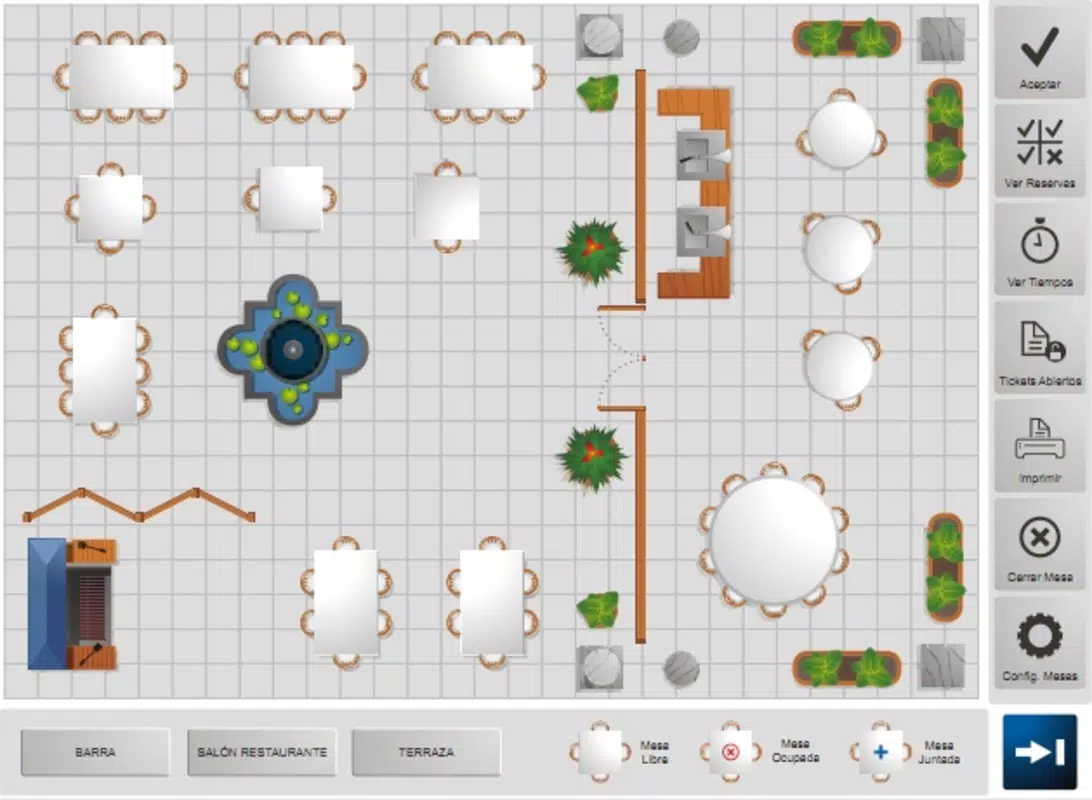
- Table Reservation System: A dedicated feature streamlines the reservation process, helping staff manage seating capacity effectively. This functionality ensures guests are seated promptly and reduces the risk of overbooking or missed reservations, especially during busy periods.
- Touchscreen Support: Designed for modern point-of-sale environments, OfiBarman fully supports touchscreen interfaces. This enhances usability in fast-paced settings, allowing staff to perform tasks quickly with minimal training.
- Real-Time Statistics: The app delivers live updates on intake and expenses, offering managers an immediate view of business health. This feature supports proactive decision-making, such as adjusting staffing levels or adjusting promotions based on current performance.
Each feature is tailored to address specific pain points in hospitality management. For example, real-time statistics allow a bar manager to detect a sudden spike in drink costs during a weekend event and take corrective action immediately. Similarly, the table reservation system can prevent double-booking and improve guest satisfaction by ensuring a smooth dining experience.
Interface, UX & Performance
OfiBarman features a user-friendly interface designed for practicality rather than aesthetic flair. The layout emphasizes accessibility, with key functions grouped logically for quick navigation. Users can expect a straightforward workflow, with essential tools like reservations, reporting, and client management accessible from main menus or dedicated tabs.
The visual style is functional, prioritizing clarity and readability over decorative elements. Text sizes and button placements appear optimized for use on touchscreen devices, which aligns with the app’s support for touch-based interaction. Navigation is likely linear and intuitive, minimizing the need for extensive training—ideal for staff with varying levels of digital literacy.
Although the developer did not list formal performance metrics, the app’s lightweight footprint of 10.8 MB suggests efficient resource usage. It is expected to run smoothly on mid-range Android devices, even in environments with limited processing power. Responsiveness appears adequate for core tasks such as updating reservations or generating reports. Stability is implied by the app’s long-standing availability, though no specific crash reports or update frequency were provided.
Platform Compatibility & Technical Requirements
OfiBarman is available exclusively on the Android platform. The current version is 2.1.2, with a file size of 10.8 MB. The app is free to download and install, making it accessible to a broad range of users in the hospitality sector.
The developer did not specify minimum OS requirements or compatibility details beyond the platform. As such, users should verify device compatibility before installation. While the app’s lightweight design suggests broad device support, performance may vary across older or less powerful Android devices. No additional permissions or hardware dependencies were disclosed.
Pros and Cons
Pros
- Specifically designed for bars and restaurants, offering relevant functionality for the industry.
- Free to download and use, reducing entry barriers for small businesses.
- Lightweight size (10.8 MB) ensures fast installation and minimal storage impact.
- Touchscreen support enhances usability in fast-paced environments.
- Real-time statistics and reporting tools support data-driven decision-making.
Cons
- Developer did not provide information on minimum OS version or device compatibility.
- No details on update frequency or long-term support plans.
- Limited public information about advanced features or integrations.
- Interface design is functional but may lack modern visual appeal.
- No cloud sync or backup functionality was mentioned.
FAQ
Is OfiBarman available for iOS devices?
The app is currently available only on Android. No iOS version has been announced or released.
Can I use OfiBarman without an internet connection?
While the app may support offline use for basic tasks like reservations or viewing client data, specific functionality may require connectivity for reporting or synchronization.
Does OfiBarman support multiple users or team access?
Information about multi-user access or role-based permissions was not provided by the developer.
How often is OfiBarman updated?
The developer did not disclose the update frequency or release schedule for new versions.
Is OfiBarman secure for storing client and financial data?
Security measures were not detailed. Users should exercise caution when entering sensitive information and consider local data protection practices.
Final Thoughts
OfiBarman stands out as a focused, no-frills solution for bars and restaurants seeking to streamline their daily operations. Its core strengths lie in its industry-specific features—client and employee management, table reservations, real-time statistics, and reporting—offering tangible benefits for managers and staff alike. While the app lacks modern polish and detailed technical disclosures, its long-standing presence and free availability make it a compelling option for small to mid-sized establishments.
For hospitality professionals looking to improve efficiency without investing in complex systems, OfiBarman delivers practical value. It excels in simplifying administrative tasks and providing actionable insights, all within a compact and accessible package. The absence of detailed compatibility and update information is a minor drawback, but the app’s proven track record suggests reliability.
Download OfiBarman now


